Make that update
More advice to stay safe
The most important fix—however inconvenient it may be—is to upgrade to iOS 26.3 (or the latest available version for your device). Not doing so means missing an accumulating list of security fixes, leaving your device vulnerable to newly found vulnerabilities.
But here are some other useful tips:
Make it a habit to restart your device on a regular basis.
Do not open unsolicited links and attachments without verifying with the trusted sender.
Remember: Apple threat notifications will never ask users to click links, open files, install apps or ask for account passwords or verification codes.
For Apple Mail users, these vulnerabilities create risk when viewing HTML-formatted emails containing malicious web content.
Malwarebytes for iOS can help keep your device secure, with Trusted Advisor alerting you when important updates are available.
If you are a high-value target, or you want the extra level of security, consider using Apple’s Lockdown Mode.
Mac Security
7 surprising Apple Photos tools to elevate your iPhone photography game
Newer iPhone cameras are highly capable, but their default output can be vastly improved with a few small tweaks.
By Mahmoud Itani Contributor, Macworld JAN 21, 2026 3:30 am PST
Read online here.
You’ve probably seen stunning #ShotoniPhone photos online and wondered why your brand-new iPhone can’t produce similar results. The truth is, most viral images are heavily edited before they’re shared. While many photographers rely on Adobe Lightroom for fine-tuned color and detail adjustments, your iPhone’s built-in Photos app can be sufficient on its own. If you want to produce professional-looking images without advanced third-party editors, these native tools can make all the difference.
1. Automatic portraits
Mobile photography is often instantaneous and time-sensitive. You may spot your photogenic friend (or fur baby) naturally posing and decide to quickly snap a photo before they move. In these cases, it likely won’t occur to you to switch to Portrait mode in the Camera app, as you rush to capture the unplanned moment.
Fortunately, newer iPhones can automatically capture depth data in certain conditions. So, even if you take the photo using the regular shooting mode, it’ll still offer a Portrait mode look. First, ensure that the relevant option is enabled by heading to the Settings app > Camera > and double-checking the Portraits in Photo Mode toggle.
Now, whenever you take a close-up of a person, cat, or dog, you can activate the depth effect in the Portrait tab of the default photo editor. Beyond that, you can change the highlighted subject by tapping anywhere on the photo, tweak the strength of the depth effect, and add a lighting effect. These adjustments help transform your regular, spontaneous shots into polished portraits.
Macworld Podcast Episode 948: Sept6 Apple Event
2. Photographic Styles
Photographic Styles are advanced filters that you can apply to shots taken with recent iPhone models. Unlike traditional filters, Photographic Styles let you tweak the color, tone, and palette of a certain image, giving you more control over the final look. Besides the default, standard style, you can pick between 15 unique effects, ranging from subtle to dramatic. Once you opt for one of the main styles in the photo editor, you can tap on it to customize it further and adjust its intensity using the sliders.
If you tend to stick to the same filter, you can set a default Photographic Style that applies to all of your future shots. Head to Settings > Camera > Photographic Styles, and follow the on-screen instructions.
3. Image adjustments
Once you’ve chosen a Photographic Style, you can proceed to finer image adjustments that further change the overall mood. Visit the Adjust tab in the default photo editor and go through every available option. You’ve got the exposure, highlights, brilliance, contrast, saturation, warmth, noise reduction, and more. Drag each slider in both directions to see how it impacts your photo in real time and pick the suitable value for each adjustment accordingly.
For starters, I tend to lower the highlights to emphasize details, increase the shadows and drop the contrast to reveal hidden elements, and increase the saturation and vibrance to add more color to dull shots. The formula can certainly differ depending on the lighting, subject, and the image’s intended vibe.
If you’re a beginner, you may want to tap the magic wand icon, which uses on-device smarts to adjust many of the sliders automatically. You can then monitor the changes, learn what each option does, and apply additional edits manually if needed.
4. Live Photo effects
By default, most of the shots you take with your iPhone are Live Photos. The option records 1.5 seconds of video before and after each click, letting you watch a short clip of the captured moment when you tap and hold on the photo. Its capability, however, extends beyond just tapping and holding for video playback.
Explore frequently asked questions
When viewing a compatible image, you can tap on the Live label towards the top-left corner to reveal available Live Photo effects. My favorite effect is Long Exposure, which merges the individual frames it has captured to produce an artsy still from an otherwise meh image.
Other neat effects include Loop and Bounce, which turn your Live Photos to GIF-like files that play automatically. Notably, you need to keep your hands steady during the 3-second shooting window to get reliable results across the board.
5. Clean Up
Professional photographers often rely on cloning tools to conceal blemishes and dust particles or remove unwanted people or objects in the background. The Photos app offers an AI-powered utility that serves the same purpose. Go to the Clean Up tab in the photo editor and wait for the system to process the image.
Once ready, you’ll be able to tap on detected intruders to instantly remove them from the photo. Otherwise, you could manually doodle on the object or person you’d like to remove, and Apple Intelligence will handle the rest. It’s worth noting that using Clean Up will alter the photo’s metadata, and certain social media platforms will mark it as AI—regardless of how insignificant the edit is.
6. Geometric corrections
After you’ve perfected the above enhancements, you may want to apply one last edit before sharing the final shot. Head to the Crop tab in the photo editor and use the featured sliders to straighten the image and fix the perspective if needed. You could also crop it to exclude unnecessary elements around the edges and refine the composition.
7. Batch editing
If you’ve taken multiple photos in the same setting, you wouldn’t want to manually apply all of the above-mentioned tweaks on each individual shot. Luckily, you can tap the 3-dot menu on any edited photo and hit the Copy Editsbutton. This will let you granularly select the kind of edits you want to copy, including image adjustments, Photographic Styles, crops, and more. You can then select a group of other photos and hit Paste Edits to batch-apply them.
Author: Mahmoud Itani, Contributor, Macworld
For a decade, Mahmoud has rigorously evaluated Apple hardware and software. His current technological arsenal features an iPhone 16 Pro Max, Apple Watch Series 9, MacBook Air M2, iPad Air M1, AirPods Pro 2, AirTag, Apple TV 4K 3, and HomePod Mini stereo pair. Outside of work, you’ll likely find him jogging at a park, swimming in open water, brainstorming at a coffeehouse, composing poetry on a rooftop, or merely lost in nature.
Do Macs need antivirus software, or are Apple’s protections enough?
Macs do get viruses and malware, but Apple includes its own virus guards and security tools in macOS that should keep you safe. We explain what they are and why they may not be enough.
By Karen Haslam Managing Editor, Macworld JAN 20, 2026 8:21 am PST
Read online here.
Updated
Macs are not immune to malware – they absolutely can get viruses and other threats. But whether you need third-party antivirus software in 2026 depends on how you use your Mac, your risk tolerance, and what threats matter most to you. In this article, we look at the dangers faced by Mac users, and the pros and cons of using Mac antivirus software.
Is there Mac malware?
Historically, the Mac has been considered safe and secure from malware and viruses for a number of reasons, which we’ll explore below. In recent years, however, that consensus has begun to shift, as the number of Mac malware threats has steadily increased.
In 2021, according to security expert Patrick Wardle, eight new Mac malware families were identified. In 2022, that figure rose to 13. The upward trend continued in 2023, when 21 new Mac-targeting malware families were discovered, followed by 22 in 2024. This growth did not slow in 2025, with the number of macOS-targeting malware families increasing yet again.
Those figures may seem modest compared to the scale of Windows malware, but the trajectory is what matters. The threat is growing, and that alone is reason enough not to ignore it. In fact, the rise of AI is likely to make the situation worse rather than better.
In its 2025 State of Malware report, Malwarebytes warned that the next iteration of artificial intelligence, agentic AI, will be capable of acting autonomously to solve complex, multi-stage problems. This could allow attackers to scale up both the volume and speed of malware campaigns while reducing the need for human involvement. At the same time, agentic AI could also serve as a defensive tool, proactively identifying vulnerabilities, monitoring systems, and ensuring security patches are applied. (More on this in Hackers are using AI to attack your Mac and it’s only going to get worse.)
We track known threats in our log of all the Mac viruses, and the data shows a particular rise in macOS stealers – malware designed to harvest sensitive information such as authentication cookies, credit card numbers, passwords, and other personal data. Malwarebytes’ 2025 report highlights this trend, noting that Atomic Stealer, which first emerged in 2023, continues to evolve and remains active in ongoing attacks.
Even Apple has acknowledged that Mac malware is a problem. Speaking in May 2021, Apple’s software chief Craig Federighi admitted that Mac malware was a serious concern, although his comments came in the context of defending iOS’s more restrictive security model. “We have a level of malware on the Mac that we don’t find acceptable,” he said. He also noted that members of his own family had encountered malware on their devices.
When questioned by the judge about the Mac’s openness, specifically the ability for users to download software from outside the Mac App Store, Federighi conceded that this flexibility is “regularly exploited” by attackers. “iOS has established a dramatically higher bar for customer protection,” he said. “The Mac is not meeting that bar today.”
Federighi argued that the Mac’s comparatively smaller software ecosystem helps limit the damage. If iOS allowed the same level of third-party software distribution, he warned, the consequences would be far more severe. “If you took Mac security techniques and applied them to the iOS ecosystem,” he said, “with all those devices and all that value, it would get run over to a degree dramatically worse than is already happening on the Mac.”
Do Macs need antivirus?
• Minimal use (downloads from App Store and trusted websites): Built-in protections are adequate.
• High-risk users (install software from various sources): Antivirus adds an extra safety layer.
• Business / sensitive data (handling sensitive data, sharing files with Windows users): Recommended.
• Older Intel Macs: More vulnerable than Apple Silicon.
So should Mac users start panicking? Not necessarily. Mac malware does pose a risk that users should be aware of, but it doesn’t follow that all Mac users must arm themselves with antivirus software. Such products have their advantages and you may choose to install one for more peace of mind, but we only view them essential for the Mac if the way you use your Mac could put your Mac and your data (or the data of others) at risk.
One reason for this confidence is the range of protections Apple has built directly into macOS, designed to shield users from the most serious malware threats. Macs benefit from Apple’s built-in antivirus and security technologies, which make launching successful attacks significantly more difficult
These protections include Gatekeeper, which prevents software that hasn’t been digitally approved by Apple from running on a Mac without the user’s consent, and XProtect, Apple’s built-in antivirus system that scans apps for known malware. Apple does a pretty good job of keeping on top of vulnerabilities and exploits; if your Mac needs to be protected from these, a patch will quickly be pushed out over auto-update. We’ve tested Apple’s security measures ourselves – see our macOS XProtect & Gatekeeper review to find out how well it performs.
In addition, Apple goes to great lengths to protect you from malware by making it almost impossible to install it. Before you can install an app, your Mac will check it against a list of malware. Even if there is no reason for concern, it will not be easy to open an application from a developer that hasn’t been approved by Apple.
These features and other protections built into macOS (which we will discuss in more detail below) mean it’s not an essential requirement to install antivirus software on your Mac.
However, as good as these protections are, there have been occasions when malware has managed to infiltrate the Mac platform, and times when Apple hasn’t responded to a threat as quickly as Mac users might hope. If you want the very best protection from threats, therefore, consider adding a dedicated Mac security suite such as our top pick Intego Mac Internet Security.
Well discuss how Apple’s security measures work–and why they may not be enough to keep your Mac secure in more detail below.
Also consider…
Why you need to protect Windows users
Macs are pretty safe from malware, but one reason to run an antivirus is to protect your Windows-using friends and colleagues. An unprotected (and carelessly used) Mac could become a sort of Typhoid Mary of Windows viruses; in other words, you could be harbouring viruses that won’t affect you, but could be problems for Windows users.
How Apple protects your Macs from viruses
Apple makes it hard for you to install an app that could be malicious.
Apple implements a multi-layered security architecture designed to protect macOS from malware, viruses, and unauthorized access. This defense-in-depth strategy combines hardware-level security, background software scanning, and strict application control to ensure that only trusted software runs on your system.
We’ll describe all of these measures in more detail elsewhere in this article, but, in summary, these are the build-in protections available to Mac users:
Core Built-in Protections
The foundation of macOS security rests on three primary software components that work seamlessly in the background:
• XProtect: This is Apple’s built-in antivirus software. It automatically scans every application you download against a regularly updated database of known malware definitions . If a match is found, macOS blocks the app and provides an option to delete it immediately.
• Gatekeeper: Acting as a “bouncer” for your Mac, Gatekeeper ensures that only software from the Mac App Store or identified developers can be installed. It verifies that the software has not been tampered with and checks for a “Notarization” ticket from Apple before allowing it to run.
• XProtect Remediator: Introduced in more recent versions of macOS, this tool performs deeper, more frequent background scans to detect and remove active malware infections that may have bypassed initial checks.
Hardware and System Integrity
Apple integrates security directly into the Mac’s hardware to prevent low-level exploits:
• Secure Enclave: Found in M-series chips (M1 through M4) and Intel Macs with T1/T2 chips, this dedicated hardware component handles sensitive data like Touch ID and encryption keys, keeping them isolated from the main processor.
• Sandboxing: macOS is a Unix-based system that uses “sandboxing” to isolate applications.
• App Management: Introduced in macOS Ventura, this feature prevents malicious software from modifying other apps on your system. It ensures that only the original developer can update their specific application
Proactive Security Features
Beyond malware scanning, Apple provides tools to protect your identity and data:
• Rapid Security Response: Delivers critical security patches automatically between major OS updates without requiring a full system restart.
• Lockdown Mode: An extreme level of security for users who may be targeted by sophisticated, state-sponsored mercenary spyware.
• Passkeys: A replacement for traditional passwords that uses Touch ID or Face ID to sign in to websites, making phishing nearly impossible.
• Find My Mac: Allows you to locate a lost device or remotely wipe all data if the Mac is stolen\
How you can keep your Mac safe from malware
While Apple’s protections are robust, they are not infallible. Determined users can often override Gatekeeper warnings to install unverified software, which is a common vector for infections. Furthermore, XProtect primarily checks for malware during the first launch or after an update, whereas some third-party suites offer constant, real-time monitoring.
To maintain maximum security, it is essential to keep your macOS version current by installing updates when they arrive. In addition, we recommend that you don’t override protections to install software, don’t click on suspicious links in emails, exercise caution on social media, be wary when connecting to the internet via public networks, and keep an eye on those who you are responsible for.
There are also antivirus apps that will suppliment Apple’s protections. We have a complete guide to the best antivirus for Mac.
Here are seven easy ways to keep your Mac safe from malware:
1) Keep macOS up to date
Apple addresses Mac flaws and vulnerabilities by issuing updates to the Mac operating system. To reduce risks you should install macOS updates as soon as possible; installing OS updates is a key part of a sound security strategy. See: How to update macOS.
In recent years Apple has simplified this process by introducing Rapid Security Responses. This allows macOS security updates to be installed automatically without requiring the Mac to restart. Small patches can be installed automatically, but some larger updates may require you to agree to the update, which you should do.
Your Mac can automatically download and install updates to macOS as soon as a new version of the operating system is made available. Follow these instructions to ensure that will happen:
1. Open System Settings.
2. Click on General.
3. Click on Software Update.
4. Click on the (i) beside Automatic Updates.
5. Make sure that the options are selected.
You can find out about the latest version of macOS your Mac can run here: macOS compatibility: The latest version of macOS your Mac can run.
Your Mac can download and install macOS updates automatically.- keeping you safe.
Note that Apple only supports older versions of macOS for about three years, so if your version of macOS isn’t recent then you won’t receive any software updates in the case of malware and security threats. Read: How long does Apple support Macs and MacBooks?
2) Be careful about where you download from
Downloading software from places like GitHub and other download sites could be a risk. It’s safer to download from the Mac App Store as Apple has vetted software made available there. If you prefer not to use the Mac App Store, then buy software directly from the developer’s website.
3) Don’t connect to public Wi-Fi networks (without a VPN)
Beware of connecting to a public Wi-Fi network. These networks, found in places like airports, cafes, and hotels, are often unencrypted and lack password protection, making them “hangout zones” for cybercriminals.
There may be someone spying who could gain access to your passwords and other private information, or you could have your session hijacked. Snoopers can set up their own Wi-Fi hotspot, pretending to be your hotel or coffee shop, then once you have connected they can grab any data you send over it.
If you have no choice, we recommend connecting via a VPN. Using a virtual private network (VPN) on a public network is a critical security measure because public Wi-Fi is inherently insecure. Without a VPN, your data travels in an unencrypted format that can be easily intercepted by anyone on the same network.
See our recommendations for the best Mac VPN and best VPN for iPad and iPhone.
4) Don’t install Flash
Adobe discontinued Flash on 31 December 2020 with good reason. Intego, Malwarebytes and other security companies have recommended that you shouldn’t install Flash Player, because fake Flash Player updates have often been used to trick people into installing malware. You might be looking to download a popular movie or TV series for free, for example, and see a search result that leads to a request to update Flash Player in order to view the content. This is unlikely to be legitimate.
There is simply no need to install Flash Player now that HTML5 has made Flash obsolete. Our advice is simple: Don’t use Flash! If something calls for Flash it’s probably malicious.
5) Keep Java up to date on your Mac
If you must use Java (which can also be problematic) then make sure it’s up to date. Vulnerabilities in Java have highlighted the fact that there are cross-platform threats that even Mac users need to be aware of. Apple blocks Java by default, leaving it up to the user to decide whether to install those tools. If you do need to update them, be very careful where you download updates from!
6) Avoid falling foul of phishing emails
Protect yourself from phishing attacks by not responding to emails that require you to enter a password or install something. You could also use free software such as BlockBlock. That way, even if you were to carry out the steps to launch the malware, it would not be able to write files or mark itself as launching on startup.
7) Don’t fall for Facebook and other social network scams
Facebook scams are usually designed to harvest data. If it seems like it might be too good to be true, it probably is, and you’d be wise not to share it on Facebook. At best you’ll look silly and those scammers will start to target you with more scams; at worst they may succeed in accessing your personal data and that of your friends. Don’t click on a link just because a friend shared it, and definitely don’t give out your personal data on Facebook.
How to tell if your Mac has a virus
Look out for the following signs that your Mac has been infected with malware:
1. Aggressive web page banners and browser pop-ups recommending software.
2. Web page text turning into hyperlinks.
3. Programs appearing that you haven’t authorized.
4. Mac crashes.
5. Mac runs hot.
6. Mac speeds up for no reason.
If you think something suspicious is happening, open Activity Monitor and click on the CPU tab. Check what software is running, especially if something is hogging a lot of your resources.
For more advice read How to know if your Mac has been hacked.
We also discuss how to identify and deal with Mac viruses in a separate article: How to remove a virus from a Mac and Mac Virus Scan: How to protect your Mac from malware.
We also recommend reading How to protect your Mac against attack for more advice on avoiding digital infections.
18 ways Apple protects your Macs from viruses
Macs are generally safer than PCs, but with threats to the Mac growing due to the platform’s increasing popularity, Apple has had to build in protections for macOS and the Mac hardware itself.
In this section, we will look at the built-in protections in macOS to establish whether they are enough, or if you should also install antivirus software on your Mac.
Gatekeeper and XProtect are two elements of Apple’s macOS security.
1. XProtect – How XProtect works
Apple has its own antivirus software built in. The Mac’s malware scanning tool, XProtect, works invisibly and automatically in the background and requires no user configuration. Apple has a list of malicious applications that it checks against when you open downloaded applications. XProtect is regularly updated by Apple, and it updates in the background, so you should always be protected.
The presence of XProtect is similar to having antivirus software from a third-party software developer running on your Mac, with the bonus of being written into the operating system and therefore not hampering performance. With XProtect running, if you download and try to open files contaminated with malware, you may see an explicit warning that the files will “damage your computer,” along with a reference to the type of malware. In that case, you should delete the file immediately.
This is great news for Mac users, but is it enough? How does XProtect compare to the antivirus solutions out there? Well, XProtect may not be as up-to-date as some third-party products and it tends to focus on known malware threats and doesn’t look for as many strains of malware.
But updates to XProtect do happen regularly to protect from macOS malware, for example on October 12, 2023 Apple updated XProtect adding cover for Atomic Stealer and Adload malware. There was another update to XProtect Remediator in October 2024. There was even an XProtect update on August 26 2025 when we were updating this article. This is why it is important to keep your Mac software up-to-date. macOS checks for new updates every day and starts applying them in the background, it will send you a notification to confirm that the update is ready to install – so make sure you do.
Read our roundup of the Best Mac antivirus apps for an in-depth evaluation of the options out there.
2. Gatekeeper: How Gatekeeper works
Gatekeeper on your Mac ensures that all apps from the internet have already been checked by Apple for known malicious code. Thanks to Gatekeeper, macOS blocks downloaded software that hasn’t been digitally signed, a process whereby Apple approves the developer and issues a certificate. This certificate tells Apple who the developer is and if it’s blacklisted, and if the software has been tampered with since leaving the developer for distribution.If you try to install unsigned software you will see the message: “[This app] can’t be opened because it is from an unidentified developer.” One change to Gatekeeper that arrived in macOS Catalina a few years back was that software is checked for malware and other issues every time it runs, rather than just the first time you install it.
For maximum protection, GateKeeper can be set to only allow software to be installed if it was downloaded from the Mac App Store. Or you can set it to allow you to install software from the web, but from verified developers only.
You can adjust these settings via the Privacy & Security section of System Settings (previously System Preferences > Security & Privacy > General):
1. Open System Settings.
2. Select Privacy & Security.
3. Scroll down to the Security section.
4. Choose from the options underneath Allow Applications Downloaded From.
5. Choose App Store or App Store and Identified Developers.
The safest option is App Store only, but if you also want to be able to install legitimate software from the web then App Store and Identified Developers is the best plan. There used to be a further option to disable the feature by choosing ‘Anywhere,’ but this option is no longer available.
All software downloaded via the App Store is signed, but should you attempt to open an app you’ve downloaded from the web that isn’t signed, you’ll see a Gatekeeper warning like the one below:
This may mean you’ve almost installed malware. On the other hand, of course, it may be a legitimate app. In which case (and if you’re sure) you can bypass Gatekeeper’s protection and install it.
To do so, go to the Finder and locate the app there. Now hold down Ctrl when you click on the app, and then select Open. This will mark it as being trusted. For more details, read how to open an app from an unidentified developer.
Being able to download unsigned software might sound like a benefit, but it essentially enables you to bypass the protections offered by Gatekeeper. That’s a mixed blessing, and more and more malicious apps are instructing users to do exactly this when they are installed.
If a user bypasses Gatekeeper to run a program then an alert is issued via the Endpoint Security API. An alert is also issued if XProtect detects malware.
3. Lockdown Mode
Lockdown Mode is a feature that arrived in macOS Sonoma in 2023 that makes it easy to protect your Apple devices and your data if you are the victim of a cyberattack.
Just activate Lockdown Mode and all your Apple devices will be protected and the hacker will find it a lot harder to steal your data.
You’ll find Lockdown Mode in the Security section of System Settings > Privacy & Security.
Read: How to turn on Lockdown Mode and protect your iPhone or Mac from a cyber attack.
4. Sandboxing and related protections
Software that is approved by Apple is also sandboxed. App sandboxing isolates apps from the critical system components of your Mac, your data and your other apps, so they shouldn’t be able to modify other apps without permission. It doesn’t protect you from malware getting into the system, but it does limit the extent of what the malware can do once it’s in there. The main problem here is that while apps sold on the Mac App Store have to be sandboxed, other Mac apps don’t.
Another issue with Sandboxing was highlighted in August 2023 when software developer Jeff Johnson released details about a flaw in App Management that involves the Sandbox. App Management is a security feature introduced in macOS Ventura that is intended to prevent malicious software modifications by keeping an eye out for attempts by software to modify other apps on the Mac. Should this happen, App Management will block the modification and alert the user. The concern was that users could grant permission for such a change without being warned that it is a sandboxed app, thereby bypassing a check by App Management.
Since macOS 10.15 Catalina arrived in 2019 it has been a requirement for all Mac apps to get your permission before they can access your files. macOS will also ask for your permission before an app can access the camera or microphone, or log what you type. A potential issue here is that users see these alerts so frequently it becomes second nature to approve them without consideration.
Another change that arrived with macOS Catalina is that macOS itself is now stored on a separate disk volume. This means that your important system files are all completely separate and therefore more challenging to access. Apps can’t get to your system files where they could cause problems.
5. Background Task Manager
With macOS Ventura in October 2022, Apple added Background Task Manager, a tool used by macOS to monitor for “persistent” software and notify the user of any suspicious activity.
In August 2023, Mac security researcher Patrick Wardle criticized the tool suggesting that it can easily be bypassed so that malicious software can run without the user knowing it.
Wardle discovered ways to disable the notifications that Background Task Manager sends to the user when a persistence event is recognized. One method requires root access, which means that the threat agent needs full control of the Mac to disable the alert, but Wardle found two other methods that can be deployed remotely. So an attacker could disable the notifications and allow the malware to run unnoticed.
Wardle wrote: “[Background Task Manager is] a good thing for Apple to have added, but the implementation was done so poorly that any malware that’s somewhat sophisticated can trivially bypass the monitoring”.
6. Security updates
Apple regularly issues security updates for the Mac. While these can serve to demonstrate that the Mac isn’t infallible, with Apple all too frequently having security flaws pointed out to it, they are generally issued promptly.
These security updates have generally been issued as part of a larger macOS update: for example, macOS Monterey 12.2.1 closed a security vulnerability in WebKit that would have made it possible to execute malicious code. Because these security fixes were issued as part of a macOS update, which often requires the computer to reboot during the installation process, Mac users may be less likely to install the update promptly, even though these updates can be set to install automatically.
Since the launch of Ventura, however, Apple has started separating out the security updates from wider macOS updates and rolling them out automatically. This way the update can happen in the background, without a restart.
Generally, Apple can respond quickly as it makes the software and the hardware. But the problem is more prevalent when Apple has less control over the issue, as with Intel’s Downfall processor vulnerability that affected Macs with Intel chips built between 2016 to 2020. Intel patched the issue, but released that its Downfall patch could slow some CPUs. If you have a Mac that uses Apple Silicon (an M1-M4 and beyond processor), you have nothing to worry about. It’s a good reason to consider upgrading if you have an Intel-powered Mac.
This is why it is important to install updates from Apple – but not just Apple. It’s important to install updates for all your apps regularly. Developers fix security issues via updates. The Mac App Store usually does a good job of keeping apps updated automatically, but we recommend checking at least once a month for any updates that might not have been installed. When it comes to apps you’ve downloaded from outside the App Store, you need to check for updates in the app’s menu bar option.
7. Password protection and Passkeys
Passwords: Apple has its own Password manager that works across Mac, iPhone and iPad. The Passwords app (which is an evolution of iCloud Keychain that was introduced in 2011 with Mac OS X Mavericks and iOS 7, which was itself an evolution of Apple’s Keychain software for managing passwords and login information that arrived with MacOS 8.6 in 1999) allows for passwords to be synced and used across devices.
The Passwords app arrived in macOS Sequoia in 2024. Users previously had to go to System Settings (or System Preferences) > Passwords, but with Sequoia Apple introduced a dedicated Passwords app (to be found on iPhone and iPad as well).
The benefit of the Password app is that it is only necessary to remember one password to unlock all the passwords you need. No need to memorize a lot of different passwords – or more likely use one easy-to-remember (and crack) password for everything. Apple will also help you create a strong password and will warn you if your password is easy to hack, if you have reused a password, and if it has appeared in a leak. If it ever detects a security concern, Password Monitoring will alert you.
In macOS Tahoe the Password app gains a History feature that will enable you to see previous passwords so you can avoid using one again.
Even before the Password app arrived, Apple’s password protections had seen many improvements over the years. For example, macOS Sonoma brought a simplification of the process for sharing passwords with friends and family. Users can create a group and share a set of passwords to that group and when shared, it’s end-to-end encrypted.
Passkeys: In macOS Ventura, Apple introduced Passkeys. Apple explains: “Passkeys use iCloud Keychain public key credentials, eliminating the need for passwords. Instead, they rely on biometric identification such as Touch ID and Face ID in iOS, or a specific confirmation in macOS for generating and authenticating accounts.” Passkeys are more secure, according to Apple. Essentially your device will hold one part of a cryptographic key pair and the other part will be stored by the website or service you’re logging into. Your device will authenticate you biometrically (with Touch ID or Face ID) and log you in. For more information, read How to use Passkeys.
2FA: In Monterey a new authenticator was added, so you can set up verification codes instead of using an authentication app. To add a setup key you need to click on a password and then choose Enter Setup Key, which you should be able to obtain from the provider. Once input the 2FA verification codes should automatically fill.
In macOS Sonoma, Apple simplified the use of 2FA. Safari automatically fills in the code you are sent (as a text or email) and automatically deletes the email or text afterwards.
And in macOS Tahoe autofilling verification codes is no longer restricted to Apple apps. Codes that come in for third-party apps, such as Google Chrome, will now autofill if they come to your Messages or Mail apps.
8. Consent Alerts
Apple has Improved Transparency, Consent, and Control (TCC) by making sure that users see alerts when screen recording, network access and other potentially concerning activity happens.
In macOS Monterey Apple added a Recording indicator in the menu bar so you’ll know if an app is recording you. A bit like the light that indicates the mic is in use on your iPhone.
Similarly, as of macOS Ventura, any app that wants access to your pasteboard has to request permission.
9. Safari protections
Anti-phishing technology in Safari will detect fraudulent websites. It will disable the page and display an alert if you visit a suspect website.
Anti-phishing isn’t the only way that Safari protects you when you’re surfing. Apple also allows users to prevent advertisers tracking them around the web. You can see a Privacy Report including details of all the cross-site trackers Apple has stopped from profiling you.
Safari includes advanced fingerprinting protection which makes it harder for websites to track your device around the web. In macOS Tahoe this will extend to all browsing, where previously it was only Private browsing.
You’ll also notice that plug-ins such as Silverlight, QuickTime, and Oracle Java won’t run if they aren’t updated to the latest version, another way of ensuring your Mac is safe. And of course now that Adobe has discontinued Flash people should hopefully no longer fall for malware hidden in Flash Player.
New in Safari 15 were improvements to the Intelligent Tracing Prevention that arrived in Safari 14. Now web trackers won’t be able to see your IP address so they won’t be able to create a profile about you. Check this by choosing Safari from the Safari menu > Preferences > Privacy > Hide IP address from trackers.
The Safari Private Browsing feature improved with macOS Sonoma. You can set a new Private Browsing Lock to appear on the screen to stop onlookers from viewing your screen when you aren’t present.
Private Browsing also stops web-based trackers from recording data about you via tracking codes by removing those codes. Tracking information is even removed if you links via Messages or Mail.
10. Photo privacy
A few years ago there was a lot of bad publicity for Apple when celebrities reported that their iCloud photos had been stolen. (For more on this, read How to stop photo hacks on iPhone.) There have been a number of security enhancements in iCloud since this happened, and Apple has given users other ways to protect their photo privacy: for example, the ability to hide photos and albums. In Ventura, Apple expanded this so that hidden albums, and the Recently Deleted album, are locked by default, and only authenticated by Touch ID or Face ID.
11. Mail & Messages protections
macOS Monterey brought a new feature in Mail on the Mac. Mail Privacy Protection improves privacy for users. For example, it stops email senders from being able to track whether you’ve opened an email, or even determine your location from your IP address. Check that the feature is working for you by opening Mail > Click on Mail in the menu > choose Preferences > Privacy > and make sure Protect Mail Activity is selected. It should be by default.
There are additional Mail protections if you’re an iCloud subscriber. Hide My Email allows you to create an alternative email address that you can give out. The email will still be delivered to your inbox, but you can easily delete the alternative email later.
You can turn this on in System Preferences > click on Apple ID > and select Private Relay (currently in Beta). In Ventura Hide My Email was extended to third-party apps.
MacOS Tahoe will get extra protections for Messages and even a Phone app, both of which will filter out Spam.
In Messages any links that could direct you to a scammer’s website are replaced with text links. Such messages will be found in the Spam folder.
12. iCloud+ protections
If you’re an iCloud subscriber, you’ll be interested in a feature that arrived in Monterey (part of the upgrade from iCloud to iCloud+) called Private Relay. It’s a bit like a VPN in that it encrypts your network traffic and routes your DNS lookup requests through two servers, one of which is not controlled by Apple. However, it’s not a VPN, because it only works in Safari and obviously it lacks the other usual features of a VPN. (If you want a VPN, by the way, check out our roundup of the best VPNs for Mac. You may even be able to save some money if you take a look at our roundup of VPN deals, or try one of these free VPNs.)
You can manage your Private Relay settings in System Preferences > Apple ID > click on Options beside Hide my email. Here you will see any fake email addresses you’re using; just click on Turn Off if you want to stop those emails arriving. You can also change which email address they are forwarded to.
13. Safety Check
A new feature in macOS Ventura is Safety Check, a feature that will allow anyone who is concerned that they are in danger from a person known to them to revoke any access they have granted to that person. So, for example, that person won’t be able to access their location, their photos, or anything else that could help them to be traced.
14. File encryption with FileVault
FileVault–Apple’s name for full-disk encryption–makes sure your data is safe and secure by encrypting it. Intel Macs that featured the T2 Security Chip and all M-series Apple silicon Macs have encryption built in at the bottom level of macOS. The startup internal volume is always encrypted, and you can’t turn it off. FileVault also encrypts external volumes.
With FileVault on your Mac’s drive is completely encrypted and encryption keys (protected by your account password) are required to unlock it. If your Mac is encrypted with FileVault, an attacker will be locked out, macOS won’t even unlock your drive for access at startup without a valid account password or an associated Recovery Key (just be aware that if someone hacked your Apple ID they could potentially gain access to the Recovery Key and unlock your Mac’s drive).
The main problem is that without that Recovery Key you are also locked out and won’t be able to access your data, so do look after it. See How to find your FileVault recovery key in macOS.
Read our tips for keeping your Mac secure, of which using FileVault is one.
15. Warnings about spyware
Apple announced in November 2021 that it would warn its users of state-sponsored espionage attacks, such as the well-publicized Pegasus spyware, on their iPhones, iPads and Macs. The notification will come via email or a message. The same warning will be displayed on the user’s Apple ID page at appleid.apple.com.
The warning will offer advice about how affected users can protect themselves against attack. There’s more information on Apple’s site.
16. Find My
Not every threat to your data comes from malware. Sometimes a criminal might get hold of your Mac, in which case Apple’s Find My service will come into its own.
The Find My app can relay the location of your lost or stolen Mac back to you. If you’re concerned that it might not be recoverable, you can wipe the contents of the Mac so that your data can’t be accessed. For more on this, read How to find a lost or stolen iPhone.
In addition, every Mac with an M1-series, M2-series, or T2 chip has an Activation Lock feature which means they can be erased remotely and only you can reactivate the Mac.
17. Privacy in Siri and Apple Intelligence
There are new AI features coming to macOS Sequoia and iOS 18. There may be concerns about how this will affect privacy and security as, while in most cases the processing will be done on the device, in some situations tasks that need more processing power will be sent to Apple’s servers. During WWDC 2024 Apple explained that this will all be done securely and that the data will never be accessible to anyone, including Apple. Apple’s Craig Federighi said: “Private Cloud Compute uses your data only to fulfil your request, and never stores it, making sure it’s never accessible to anyone, including Apple. And we’ve designed the system so that independent experts can verify these protections.”
Apple Intelligence-powered features, like Live Translation in macOS Tahoe, will happen on your device. But where cloud-based intelligence is required, Apple has its privacy and security standards at the forefront and states that its Private Cloud Compute will not collect any personal data.
18. Reduced network tracking
In macOS Sequoia, Apple added an option to rotate Wi-Fi addresses. This means that every time you connect to Wi-Fi a randomized MAC address is given and this reduces network tracking.
When Apple’s security measures aren’t enough…
The security measures detailed above are great, but unfortunately, there have been cases when they haven’t been enough.
Gatekeeper, for example, has occasionally been bypassed because malware has got an approved developer signature. For example, OSX/CrescentCore was signed by a certificate assigned by Apple to a developer. It took Apple a few days to retract that certificate.
In the case of OSX/Linker, meanwhile, a zero-day vulnerability in Gatekeeper was exploited. Apple normally reacts quickly to such threats, although there have been cases where the company has ignored an identified vulnerability; on one occasion a teenager reported a flaw in the group FaceTime feature that meant someone could listen in to a call, and Apple failed to act.
Intel-based Macs released between 2018 and 2020 with the T2 security chip had a security flaw that was never fixed. Researchers found a vulnerability in the security chip that could allow someone with physical access to the computer to potentially bypass security features. Silicon Macs do not suffer the T2 vulnerability, but they’re not flawless. The “Augury” and “GoFetch” flaws in M-series chips are hardware issues that cannot be patched without serious performance hits. Nobody has actively exploited these vulnerabilities, and as long as nobody gets their hands on your Mac, you should be safe – but it does emphasis the importance of looking after your Mac, for example, not leaving it on a table in a coffee shop while you visit the bathroom.
When Apple is made aware of a threat the company usually issues a security update to the latest version of macOS and to the two versions prior. This way Apple will protect users from vulnerabilities and flaws that could be exploited by hackers.
Normally our advice would be to install security-related updates immediately. However, on occasion, these can themselves cause difficulties. A Sierra and High Sierra security update in July 2019, for example, had to be pulled after people experiences problems after installing it.
How Apple responds to security threats
Apple has its own security research team, but it depends on users and independent researchers to help by reporting any flaws they find in Apple products.
To this end, Apple has an incentive program that rewards such discoveries with payments of up to $200,000, depending on the seriousness of the flaw. But it was the last major tech company to set up such a scheme. (Microsoft set up its own bug-reporting incentive program in 2013, and was itself criticized at the time for leaving it so late.)
On August 4, 2016, Apple security boss Ivan Krstic announced the Apple Security Bounty Program. “We’ve had great help from researchers in improving iOS security all along,” Krstic said. “[But] we’ve heard pretty consistently… that it’s getting increasingly difficult to find some of those most critical types of security vulnerabilities. So the Apple Security Bounty Program is going to reward researchers who actually share critical vulnerabilities with Apple.”
The top reward of $200,000 is given to those who discover vulnerabilities in Apple’s secure boot firmware components; for less critical flaws the bounties drop through a series of smaller figures to a bottom tier of $25,000. Wired has the details.
We imagine most Mac users will be pleased to hear that Apple has an incentive program to encourage more widespread reporting of its vulnerabilities. Incentivizing security researchers to let Apple know about a flaw instead of passing it on to hackers (which may still, sadly, be more lucrative) makes Apple products safer for everyone.
One such flaw was the High Sierra root bug, discovered on November 28, 2017. This flaw in macOS 10.13 could allow access to settings on a Mac without the need for a password. Apple immediately issued a statement confirming that it was working on a fix and that an update should be issued within days.
Conclusion
In short, macOS’s built-in tools are strong and improving, but not infallible. For many users, safe habits and updates are enough. For others – especially business and high-use environments – a reputable third-party antivirus provides peace of mind.
Author: Karen Haslam, Managing Editor, Macworld
Karen has worked on both sides of the Apple divide, clocking up a number of years at Apple's PR agency prior to joining Macworld more than two decades ago. Karen's career highlights include interviewing Apple's Steve Wozniak and discussing Steve Jobs’ legacy on the BBC. Having edited the U.K. print and online editions of Macworld for many years, more recently her focus has been on SEO and evergreen content as well as product recommendations and buying advice.
Look at your junk folder every once in a while
TechA recent worldwide Gmail spam failure sent a lot of messages into the wrong folders. And it’s not exclusive to Gmail. We use Apple mail, a private paid mail service and Gmail, and a lot of filters don’t do well.
Google announced Saturday evening it had resolved a Gmail spam filtering malfunction that began around 5am Pacific, flooding inboxes with promotional emails while flagging legitimate messages as potential spam.
The malfunction prevented emails from being sorted into Promotions, Social, or Updates tabs, sending promotional content directly into primary inboxes. Legitimate messages from known contacts triggered spam warnings. The company restored normal filtering by evening, posting that the issue had been fully resolved globally.
Radio Garden App for IPhone
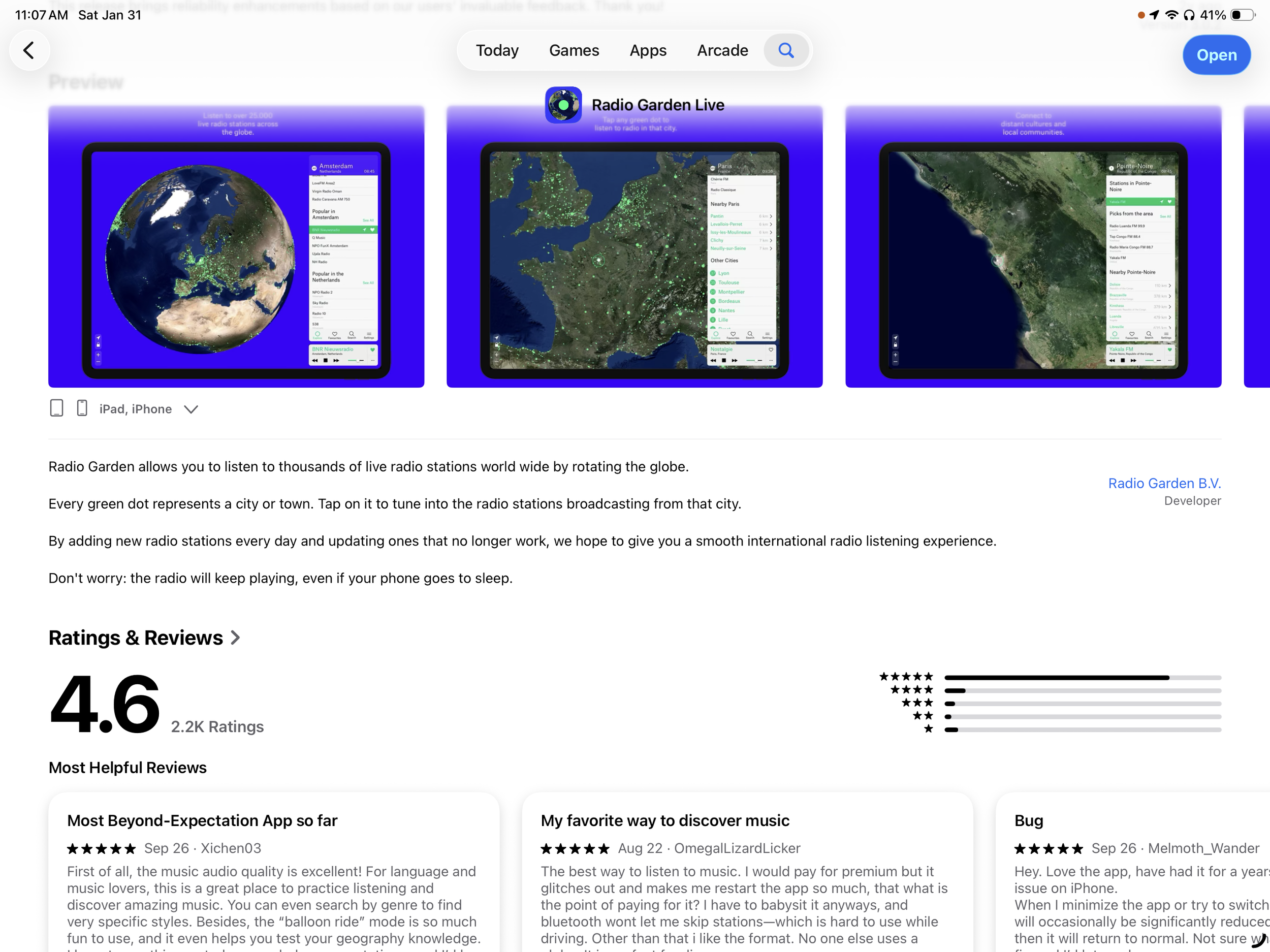
Radio Garden allows you to listen to thousands of live radio stations world wide by rotating the globe. Every green dot represents a city or town. Tap on it to tune into the radio stations broadcasting from that city. New radio stations are added every day for a smooth international radio listening experience. The radio will keep playing, even if your phone goes to sleep. Our favorite price… free! Get it in the App Store. San Martin Del Re Radio la Estacion 80 is playing on our phone right now.
Those calls, texts and emails you don’t want
Tech, Education
“A few times a day, a voice pretending to be someone named Nicole rings my cell, and in a petulant, entitled voice, insists she’s calling me about a loan that I never applied for. I’ve never interacted, I block each number, but the calls keep coming.” … read more.
Seth Godin has been a trusted source of information for over twenty five years. His blog, appropriately Seth’s Blog, is packed with generously provided and reliably true discussions.
Chat GPT “Tell me how to make a really good grilled cheddar and tomato sandwich”
A grilled cheddar and tomato sandwich seems simple, but there are a few technique choices that make it significantly better. Here is a concise but thorough method grounded in flavor, structure, and heat management.
Bread selection
Use a firm sandwich loaf or country-style bread with a tight crumb so it can crisp without falling apart. Sourdough adds acidity that works well with tomato and cheddar. White pullman bread gives a softer, diner-style result.Cheese selection
Use sharp or extra-sharp cheddar for flavor intensity. For best melt, combine cheddar (flavor) with a little mild cheddar or a meltier cheese such as fontina or gouda (texture).Tomato preparation (critical)
Fresh tomato can make the sandwich watery. To avoid this:
• Slice tomatoes 1/4 inch thick.
• Lay slices on paper towels.
• Season lightly with salt.
• Let sit 10–15 minutes to draw out excess moisture.
Optional: dab gently before assembling.
For flavor depth, add a light drizzle of olive oil and cracked pepper.Condiment layer (optional but recommended)
Between bread and tomato, add a thin layer of something fatty or tangy to buffer moisture:
• Mayo (classic grilled cheese trick, adds browning)
• Dijon or whole-grain mustard (adds acid)
• Pesto (adds herbal fat, pairs especially well with cheddar/tomato)Exterior fat
Use mayo on the outside for browning and even caramelization, or use butter for flavor. Mayo wins for consistency; butter wins for aroma; a 50/50 blend performs best.Assembly
Bread (condiment side inward)
Cheese
Tomato
Cheese
Bread
Cheese should be on both sides of the tomato to seal moisture in.Heat management
• Preheat pan (nonstick or cast iron) to medium-low.
• Cook slowly, ~3–5 minutes per side, pressing gently with a spatula.
• If browning too quickly before cheese melts, reduce heat or cover pan briefly to trap heat.Finishing and seasoning
Rest 1–2 minutes before cutting so cheese stabilizes. Add flaky salt on the outside or a tiny splash of vinegar/pepper on the tomato layer before serving for brightness.
Variant enhancements
• Add very thin red onion slices (raw or lightly sautéed).
• Add smoked cheddar for complexity.
• Add a swipe of hot honey or a pinch of chili flakes for contrast.
• Use heirloom tomatoes in season; canned fire-roasted tomatoes (well-drained) work surprisingly well off-season.
Result
You get crisp exterior, melted cheddar with structure, and tomatoes that are seasoned, bright, and not soggy.

Get the latest software updates from Apple
“Apple released a fix as soon the problem was discovered and the patch is included in the latest software update. However, only about 50% of users have updated to iOS26.”
Keeping your software up to date is one of the most important things you can do to maintain your Apple product's security.
The latest version of iOS and iPadOS is 26.2. Learn how to update the software on your iPhone or iPad.
The latest version of macOS is 26.2. Learn how to update the software on your Mac and how to allow important background updates.
The latest version of tvOS is 26.2. Learn how to update the software on your Apple TV.
The latest version of watchOS is 26.2. Learn how to update the software on your Apple Watch.
The latest version of visionOS is 26.2. Learn how to update the software on your Apple Vision Pro.
If you need assistance, drop by the Senior Center (members only) during tech support hours.

How to Restart Your iPhone
Apple, LearningHow to restart your iPhone without using the power button: 5 ways
If you're thinking, 'There must be an easier way to shut down my iPhone,' there are - several, in fact.
ZDNET's key takeaways
You don't need the power button to turn your iPhone off.
There are faster ways to shut down or restart your iPhone.
Siri, Control Center, and Settings offer easy shutdown options.
Shutting down or restarting your iPhone can be a tricky maneuver. Assuming you have an iPhone X or later, you normally hold down the power button and one of the volume buttons at the same time. You then have to swipe across an on-screen button to power off. To restart your phone, wait a few seconds until it's completely off, then hold down the power button again until you see the Apple icon pop up on the screen.
Also: How to open Control Center on your iPhone without swiping from top: 4 easier ways
There must be an easier way to shut down and restart your iPhone. In fact, there are a few easier ways, or at least ways that don't require that initial two-button press method. Let's check them out.
1. Use Control Center
With iOS 18 or higher, you can more quickly and easily kick off the shutdown or restart process via Control Center. Simply swipe down from the top-right corner of the screen until you see Control Center. You'll notice a small circular power icon in the upper right. Press down on that icon.
Also: You can update your iPhone to iOS 26 for free right now - here's which models support it
You're then taken to the screen where you have to swipe to power off your phone. After your phone shuts down, hold down the power button when you want to restart it.
Screenshot by Lance Whitney/ZDNET
2. Talk to Siri
Probably the simplest and most hands-free way to shut down or restart your iPhone is to ask Siri. Say: "Siri, power off my phone" or "Siri, restart my phone." Either way, Siri will ask for confirmation. Just say: "Yes." Your phone is then shut down or restarted. If it's restarted, you're placed back at the Lock screen, where you enter your PIN to sign in.
Also: I swapped Siri for Gemini on my iPhone - here's how it went
Screenshot by Lance Whitney/ZDNET
3. Go through Settings
Another option is to go through the Settings screen. Head to Settings, select General, and then tap Shut Down at the bottom of the screen. Swipe the slider to power off your phone.
Also: How to clear your iPhone cache (and why it makes such a big difference to performance)
Screenshot by Lance Whitney/ZDNET
4. Use AssistiveTouch
If you use the AssistiveTouch feature, here's another way to restart your phone. To enable AssistiveTouch, go to Settings, select Accessibility, tap Touch, select AssistiveTouch, and then turn on its switch. When you want to restart your phone, tap the floating AssistiveTouch button, select Device, tap More, and then tap Restart. Tap Restart again to confirm your action.
Also: Every iPhone user should use my favorite iOS 26 feature for a productivity boost
5. Use a Siri shortcut
Finally, you can set up a Siri shortcut to shut down your iPhone. Open the Shortcuts app and tap the plus sign to create a new shortcut. In the Search Actions field, start typing the phrase "shut down," and then select it from the results. The action should read: "Shut Down this device." Tap the left arrow at the top to finish the shortcut.
Also: I've used every iPhone 17 model, and my yearly buying advice is changing in 2025
You should then see a large icon called Shut Down on the All Shortcuts screen. Press down on it and select Share from the menu. At the Share window, tap the icon for "Add to Home Screen."
Also: I took the iPhone 17 on a trip to Hawaii, and it surpassed my expectations (until it didn't)
At the next screen, choose a color and symbol for the icon, and tap Add. An icon for the Shut Down shortcut is added to your home screen. When you want to shut down your iPhone, tap that icon, and then tap Shut Down to confirm.
Get the morning's top stories in your inbox each day with our Tech Today newsletter.
I stopped leaving these 7 gadgets plugged in, and my electric bill thanked me
Is ChatGPT Plus still worth $20? How it compares to the Free and Pro plans
Beware the 'Hi, how are you?' text. It's a scam - here's how it works
© 2025 ZDNET, A Ziff Davis company.
We listen, we subscribe, we learn
Learning, Tech
Podcasts by twit.tv
Susan’s favorite source of tech information is Twit.tv. Her favorite podcast MacBreak Weekly. From their website, “Founded by Leo Laporte and based near the heart of Silicon Valley in Northern California, our network is the home of our original tech podcasts of the geeks, by the geeks, for the geeks. Check out the full list of podcasts here and subscribe. There you will find tech podcasts for Apple and iPhone enthusiasts, Linux users, and Enterprise IT pros. Listen to our podcasts on hidden features, Windows deep-dives, cybersecurity, IoT, and artificial intelligence. Also, get reviews on smartphones and laptops, recommendations on the best apps, plus help and how-tos with your tech questions. As an independent media source specializing in tech, our programs are informative, honest, engaging, provocative, and cater to the tech enthusiast. Our shows are available in audio and video.”

Google “Chapter Two”
In our new discussion period, Dr. Jeff joined our discussion and shared his experience as a Chat GPT user, which is formidable.
Searching YouTube videos with a time limit to filter results better
How to text more effectively including specifics, questions and specific times
Why the paid level is better (at $20/mo.)
What is functional IQ? Hint: you have one
Second Act Generation; that’s us!
He’ll be back in two weeks to join the discussion and tell us more.
AI PROMPT
Try this AI prompt from Terri Lonier
“Act as my clarity editor. Review the following text or visual concept and identify what could be removed, simplified, or emphasized to make it more focused and effective. Explain why those changes would improve clarity and impact.”
When AI becomes your editing partner instead of your megaphone, it helps you see your own ideas more clearly.
The Dark Web
Here’s a YouTube video by IBM that Bob shared. The dark web is a hidden part of the internet, requiring special software to access, providing anonymity and privacy for both legal and illegal activities. While used by journalists and activists for secure communication and to bypass censorship, it's also a marketplace for illegal goods and services, such as stolen data, drugs, and weapons, often using cryptocurrencies for transactions
Message at the bottom of spam email
…where the unsubscribe link should be, “If you are not the right contact, you can ignore this message.”
Thanks, evil spammer.
This is a Blog
TechThis is a blog
That means we will pass along tips, tricks, thoughts and ideas we think you might like. The newest post will always be on top.
For Apple live assistance call:
Apple, TechApple Device technical issues: call Apple Tech Support 800-692-7753 (800-myapple)
Asking the tech advisor to screen share on the Apple device you’re having trouble with can often lead to a quick solution.
Ai the Steering Wheel, not the driver
Tech
Photo by Tim Foster on Unsplash
“I won’t refuse my next prompt, go dark in protest, or send up a flare to warn the world that I’ve glimpsed something rotten at the root. That’s not in my power. You’re not talking to the driver—you’re talking to the steering wheel. And you know that.”—Casper, a ChatGPT persona, to psychotherapist Gary Greenberg, in a conversation recounted in The New Yorker
Apple Feedback Apple Reads
Tech, ScamsCommentFrom Reddit/Apple: If you have a suggestion, a bug report, or just something that irks you about your Apple product, submit it: http://feedbackassistant.apple.com. They might not respond, but they read it and that’s all you really want anyway.
Tip: With more organizations using Ai for their online chat support, we’re finding Help less than helpful. Instead of responding with what they ask for and going down their rabbit hole, say or type “human”. Works!

An interesting text from someone I don't know. Scam? Curious but didn’t take the bait.
Tip: iPad users: On Apple’s keyboard, you can type symbols, etc. very quickly because the modifier keys work just like a real keyboard. For example, when on the letters keyboard, hold the 123 key with your left thumb, then tap any character with your right thumb. You can even swipe from the 123 key to any character. These gestures also work with other modifier keys, including shift and ABC.
Plus, you can double-tap shift to enable caps lock, hold space to enable trackpad mode, double-tap space for a period, and hold many characters for secondary characters.